Chapter 11 Shell Script Basics
Shell Script Basics
(11.1)
The shebang (#!) starts a script followed by the type of shell the script should execute. A bash scripts starts as follows: #!/bin/sh.
Quoting and Literals
(11.2)
Quotes are important. echo $100 or echo "$100" or echo '$100' each mean different things and might give different output (output is: 00, 00, $100 respectively).
When writing scripts and working on the command line, remember what happens whenever the shell runs a command:
- Before running, the shell looks for variables, globs and other substitutions.
- Shell passes the results of the substitutions to the command.
grep r.*t /etc/passwdmight turn intogrep r.input r.output /etc/passwdif you have these files in your active directory. Be careful!
Single quotes wil resolve the example above. As far as the shell is concerned all characters between two single quotes, including spaces, make up a single parameter.
Note: That's why
grep 'r.*t' /etc/passwdwill work and 'r.*t /etc/passwd'` wont.
Double quotes work just like single quotes, except that the shell expands any variables that appear withing double quotes.
Note: a b c are three parameters while a "b c" are only two.
Special Variables
(11.3)
$1, $2 and all variables named as positive nonzer integers contain the values of the script parameters. The built-in shell command shift can be used to remove the first argument ($1) and advance the rest forward ($2 becomes $1).
Others:
- $# is the number of arguments
- $@ reprensents all of a script's arguments
- $0 holds the name of the script
- $$ holds the process ID of the shell
- $? holds the exit code
Exit Codes
(11.4)
When a Unix program finishes it leaves an exit code. When it is 0 it usually means that the program ran without a problem.
Note: If you intend to use the exit code of a command, you must use or store it immediately after running the command.
Note²: When writing shell code that aborts a script, use something like exit 1 or something different from 0.
Note³: Some programs return non-zero exit codes as a result of an operation without trying to tell you they failed. Examples are grep and diff (they return 0 if they match a pattern and 1 if they don't, 2 is then the real error code).
Conditionals
(11.5)
#!/bin/sh
if [[ "$1" = hi ]]; then
    echo 'The first argument was "hi"'
else
    echo -n 'The first argument was not "hi" -- '
    echo It was '"'$1'"'
fi
Note: [ is actually a program called test.
Note²: Use "$1" when checking parameter lists to not get an error when they are empty.
&& and || are logical constructs (and and or) and can be replaced with -a and -o.
[ -f file ] checks whether file is a regular file (not a directory or special file). A test can be inverted with the ! operator.
File Tests
Mostly unary operations (they require only one argument).
- -e true if file exists
- -s true if file is not empty
| Operator | Tests For |
|---|---|
| -f | regular file |
| -d | directory |
| -h | symbolic link |
| -b | block device |
| -c | character device |
| -p | namped pipe |
| -S | socket |
| Operator | Operator |
|---|---|
| -r | readable |
| -w | writable |
| -x | executable |
| -u | setuid |
| -g | setgid |
| -k | sticky bit |
Finally there is the possibility for binary operators. -nt (newer than), -ot (older than) and -ef (compares two files and returns true if they share inode numbers and devices = hard links).
String Tests
| Operator | Operator |
|---|---|
| = | true if operands are equal |
| != | true if operands are not equal |
| -z | true if argument is empty |
| -n | true if argument is not empty |
Arithmetic Tests
Note: When using numbers use -eq instead of =
| Operator | Returns true when first argument is .. the second |
|---|---|
| -eq | equal to |
| -ne | not equal to |
| -lt | less than |
| -gt | greater than |
| -le | less than or equal to |
| -ge | greater than or equal to |
Matching strings with case example:
#!/bin/sh

case $1 in
    bye)
        echo Fine, bye.
        ;;
    hi|hello)
        echo Nice to see you.
        ;;
    what*)
        echo Whatever.
        ;;
    *)
        echo 'Huh?'
        ;;
esac
Loops
(11.6)
For loops (foreach)
#!/bin/sh
for str in one two three four; do
    echo $str
done
While loops
#!/bin/sh

FILE=/tmp/whiletest.$$;
echo firstline > $FILE
while tail -10 $FILE | grep -q firstline; do
..
done
Command Substitution
(11.7)
The Bourne shell can redirect a command's standard output back to the shell's own command line. You can store the command output in a shell variable by enclosing a command in $().
Note: Consider using a pipeline to xargs (or use the -exec option) if you want to invoke a command on several filenames that you get as a result of a find command.
Note²: The traditional syntax for command substitution is are back-ticks. Use the newer $() instead.
Temporary File Management
(11.8)
The mktemp command can be used to create temporary filenames.
#!/bin/sh

TMPFILE1=$(mktemp /tmp/im1.XXXXXX)
TMPFILE2=$(mktemp /tmp/im2.XXXXXX)

..

rm -f $TMPFILE1 $TMPFILE2
Note: If the script is aborted, the temporary files could be left behind. Use the
trapcommand to create a signal handler to catch the signal that CTRL-C generates and remove the temporary files!
trap "rm -f $TMPFILE1 $TMPFILE2; exit1" INT
Here Documents
(11.9)
Used for a large section of txt.
#!/bin/sh

DATE=$(date)
cat <<EOF
Date: $DATE

The output above is from the Unix date command.
It's not a very interesting command.
EOF
The <<EOF and EOF control the here document.
Extra (slides + notities)
- Use ( ) for subshell.
read varreads from standard input and stores in $var.
(Slides)
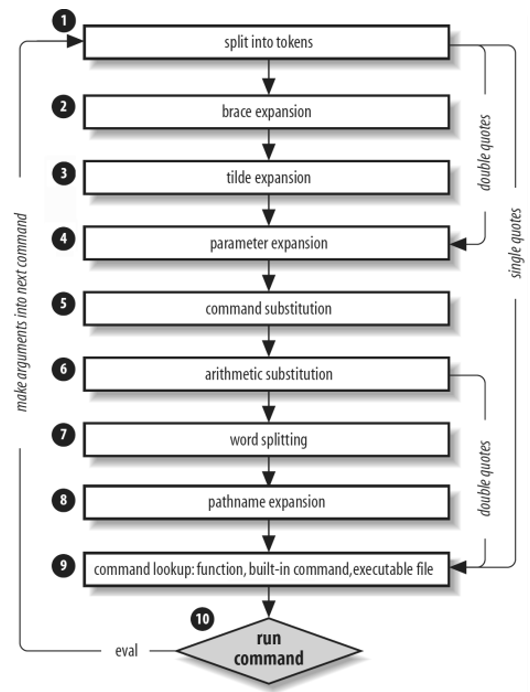
TODO detail of sequence.
var=$(printf) wordt beter vervangen door printf -v var.
Process substitution kan via <(...) of >(..).
I/O gebeurt via file descriptor, gekoppeld aan tijdelijke named pipe ls -l <(:) >(:). Dit kan een alternatief bieden voor pipes en subshells.
TODO vb van process substitution.
Parameter expansion ondersteunt extended globbing.
TODO vb van parameter expansion.
Arithmetic substitution.
TODO vb van arithmetic substitution.
Speciale variabelen zijn:
- $0
- $?
- $$
- $-
- $IFS
- $REPLY
- $BASHOPTS & $SHELLOPTS
- $LINENO
- $RANDOM
- $SECONDS
- $PWD & $OLDPWD
- $UID
- ${GROUPS[@]}
- ${BASH_REMATCH[@]}
- ${PIPESTATUS[@]}